Back to Repositories View on GitHub
TypeScriptOpen Source
Flowise
0Stars
0Forks
Updated recently
No License
About this Repository
Full Description
<!-- markdownlint-disable MD030 -->
<p align="center">
<img src="https://github.com/FlowiseAI/Flowise/blob/main/images/flowise_white.svg#gh-light-mode-only">
<img src="https://github.com/FlowiseAI/Flowise/blob/main/images/flowise_dark.svg#gh-dark-mode-only">
</p>
<div align="center">
[](https://github.com/FlowiseAI/Flowise/releases)
[](https://discord.gg/jbaHfsRVBW)
[](https://twitter.com/FlowiseAI)
[](https://star-history.com/#FlowiseAI/Flowise)
[](https://github.com/FlowiseAI/Flowise/fork)
English | [繁體中文](./i18n/README-TW.md) | [简体中文](./i18n/README-ZH.md) | [日本語](./i18n/README-JA.md) | [한국어](./i18n/README-KR.md)
</div>
<h3>Build AI Agents, Visually</h3>
<a href="https://github.com/FlowiseAI/Flowise">
<img width="100%" src="https://github.com/FlowiseAI/Flowise/blob/main/images/flowise_agentflow.gif?raw=true"></a>
## 📚 Table of Contents
- [⚡ Quick Start](#-quick-start)
- [🐳 Docker](#-docker)
- [👨💻 Developers](#-developers)
- [🌱 Env Variables](#-env-variables)
- [📖 Documentation](#-documentation)
- [🌐 Self Host](#-self-host)
- [☁️ Flowise Cloud](#️-flowise-cloud)
- [🙋 Support](#-support)
- [🙌 Contributing](#-contributing)
- [📄 License](#-license)
## ⚡Quick Start
Download and Install [NodeJS](https://nodejs.org/en/download) >= 18.15.0
1. Install Flowise
```bash
npm install -g flowise
```
2. Start Flowise
```bash
npx flowise start
```
3. Open [http://localhost:3000](http://localhost:3000)
## 🐳 Docker
### Docker Compose
1. Clone the Flowise project
2. Go to `docker` folder at the root of the project
3. Copy `.env.example` file, paste it into the same location, and rename to `.env` file
4. `docker compose up -d`
5. Open [http://localhost:3000](http://localhost:3000)
6. You can bring the containers down by `docker compose stop`
### Docker Image
1. Build the image locally:
```bash
docker build --no-cache -t flowise .
```
2. Run image:
```bash
docker run -d --name flowise -p 3000:3000 flowise
```
3. Stop image:
```bash
docker stop flowise
```
## 👨💻 Developers
Flowise has 3 different modules in a single mono repository.
- `server`: Node backend to serve API logics
- `ui`: React frontend
- `components`: Third-party nodes integrations
- `api-documentation`: Auto-generated swagger-ui API docs from express
### Prerequisite
- Install [PNPM](https://pnpm.io/installation)
```bash
npm i -g pnpm
```
### Setup
1. Clone the repository:
```bash
git clone https://github.com/FlowiseAI/Flowise.git
```
2. Go into repository folder:
```bash
cd Flowise
```
3. Install all dependencies of all modules:
```bash
pnpm install
```
4. Build all the code:
```bash
pnpm build
```
<details>
<summary>Exit code 134 (JavaScript heap out of memory)</summary>
If you get this error when running the above `build` script, try increasing the Node.js heap size and run the script again:
```bash
# macOS / Linux / Git Bash
export NODE_OPTIONS="--max-old-space-size=4096"
# Windows PowerShell
$env:NODE_OPTIONS="--max-old-space-size=4096"
# Windows CMD
set NODE_OPTIONS=--max-old-space-size=4096
```
Then run:
```bash
pnpm build
```
</details>
5. Start the app:
```bash
pnpm start
```
You can now access the app on [http://localhost:3000](http://localhost:3000)
6. For development build:
- Create `.env` file and specify the `VITE_PORT` (refer to `.env.example`) in `packages/ui`
- Create `.env` file and specify the `PORT` (refer to `.env.example`) in `packages/server`
- Run:
```bash
pnpm dev
```
Any code changes will reload the app automatically on [http://localhost:8080](http://localhost:8080)
## 🌱 Env Variables
Flowise supports different environment variables to configure your instance. You can specify the following variables in the `.env` file inside `packages/server` folder. Read [more](https://github.com/FlowiseAI/Flowise/blob/main/CONTRIBUTING.md#-env-variables)
## 📖 Documentation
You can view the Flowise Docs [here](https://docs.flowiseai.com/)
## 🌐 Self Host
Deploy Flowise self-hosted in your existing infrastructure, we support various [deployments](https://docs.flowiseai.com/configuration/deployment)
- [AWS](https://docs.flowiseai.com/configuration/deployment/aws)
- [Azure](https://docs.flowiseai.com/configuration/deployment/azure)
- [Digital Ocean](https://docs.flowiseai.com/configuration/deployment/digital-ocean)
- [GCP](https://docs.flowiseai.com/configuration/deployment/gcp)
- [Alibaba Cloud](https://computenest.console.aliyun.com/service/instance/create/default?type=user&ServiceName=Flowise社区版)
- <details>
<summary>Others</summary>
- [Railway](https://docs.flowiseai.com/configuration/deployment/railway)
[](https://railway.app/template/pn4G8S?referralCode=WVNPD9)
- [Northflank](https://northflank.com/stacks/deploy-flowiseai)
[](https://northflank.com/stacks/deploy-flowiseai)
- [Render](https://docs.flowiseai.com/configuration/deployment/render)
[](https://docs.flowiseai.com/configuration/deployment/render)
- [HuggingFace Spaces](https://docs.flowiseai.com/deployment/hugging-face)
<a href="https://huggingface.co/spaces/FlowiseAI/Flowise"><img src="https://huggingface.co/datasets/huggingface/badges/raw/main/open-in-hf-spaces-sm.svg" alt="HuggingFace Spaces"></a>
- [Elestio](https://elest.io/open-source/flowiseai)
[](https://elest.io/open-source/flowiseai)
- [Sealos](https://template.sealos.io/deploy?templateName=flowise)
[](https://template.sealos.io/deploy?templateName=flowise)
- [RepoCloud](https://repocloud.io/details/?app_id=29)
[](https://repocloud.io/details/?app_id=29)
</details>
## ☁️ Flowise Cloud
Get Started with [Flowise Cloud](https://flowiseai.com/).
## 🙋 Support
Feel free to ask any questions, raise problems, and request new features in [Discussion](https://github.com/FlowiseAI/Flowise/discussions).
## 🙌 Contributing
Thanks go to these awesome contributors
<a href="https://github.com/FlowiseAI/Flowise/graphs/contributors">
<img src="https://contrib.rocks/image?repo=FlowiseAI/Flowise" />
</a><br><br>
See [Contributing Guide](CONTRIBUTING.md). Reach out to us at [Discord](https://discord.gg/jbaHfsRVBW) if you have any questions or issues.
[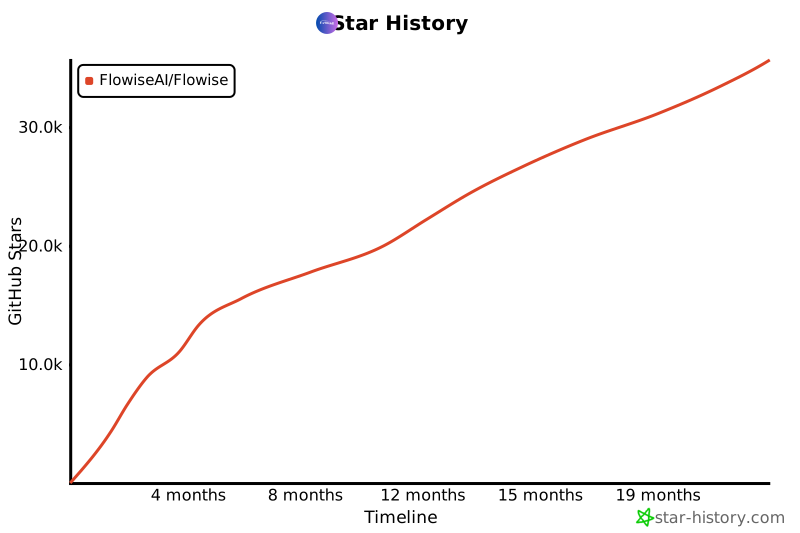](https://star-history.com/#FlowiseAI/Flowise&Date)
## 📄 License
Source code in this repository is made available under the [Apache License Version 2.0](LICENSE.md).
Owner
R
Unknown
Topics
Tech Stack
TypeScript
Primary language used in this repository.